Mouse Acceleration Preference Pane for Mac OS X

Mouse On Fire

Extented mouse settings

The Mouse Acceleration PrefPane is a GUI and startup item to Richard Bentley's MouseFix.
You can set up extended speed parameters and acceleration curves for your mouse.

  • Increase mouse pointer precision
  • Speed up your mouse movement
  • Set mouse acceleration parameters
  • Full control with just two simple knobs

Apple dropped the mouse acceleration API (scaling) with 10.6 Snow Leopard. There is now a version supporting 10.5 and 10.6 with 32/64bit.
This newer version 1.1 is without explicit acceleration settings. If you still run 10.5 Leopard you can use the 1.0 version with curves. With the 10.6 Snow Leopard version try a inverted setting at about -1.0x.

Screenshots

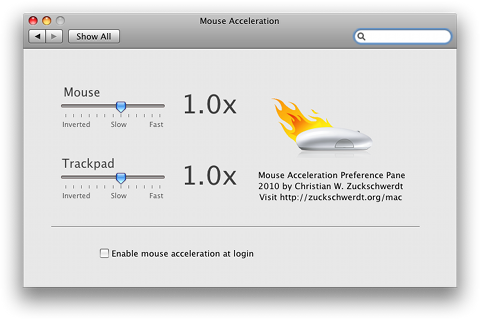
Screenshot 1
Screenshot 1
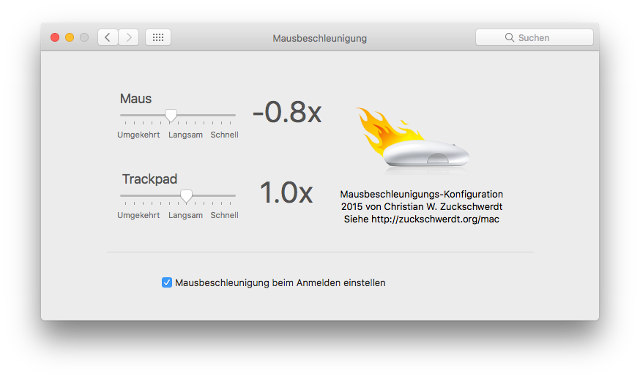
Screenshot 2
Screenshot 2

Version 1.0
Version 1.0

Version 1.1
Version 1.1

License

This is Free Software for Mac OS X

Mouse Acceleration Preference Pane is free.
You can use and redistribute it freely.

Comments

Default values for Mouse and Trackpad

Apples default values seem to be 2.0 on both Mouse and Trackpad.

what are the default values

what are the default values for mouse and trackpad on version 1.1?

danke

oh my f**** god, u made my day......

i've bought a magic mouse and was about to throw it out of the window, cos the mouse acc. nearly drove me insane....

vielen dank ^^

More settings

Sorry Gn0m4, it's not possible to have different settings for speed and acceleration. There is only one setting in the Apple API.

Great but no speed scroller

-1x is perfect for acceleration but to much speed for mouse movement. There´s no different in velocity with -0.1x

Can you put other scroll to adjust it?
Thanks!

FINALLY!

I realize i am likely saying the same thing as everybody else (i haven't read through all the comments) but this is THE GREATEST THING EVER. I have been a mac lover for years, but also always infuriated by this MAJOR problem with the mac OS. Thank you so much for finally offering a non-hack style of fix that is dependable.

Thank You!

Thanks so much!

I just wanted to come back here and thank you from the bottom of my heart for this wonderful tiny piece of software.

I've been a Mac user for about 6 months and the mouse acceleration made me life on a Mac miserable. A pain. I absolutely hate the way macs handle acceleration. It's like you drag your cursor in a layer of mud when you need precision slow movement, and if you are a designer you are in deep s***. Macs are wonderful but it's unbelievable how they can go sooooo wrong with a basic extremely important feature like the mouse cursor movement! At least you should be able to turn it off without third party plugins, but noooooo...

I managed to survive these 6 months by using different scripts and settled to one that I had to restart myself after each reboot (several times a day). It was a pain but I could get my cursor to move as it should. After installing your software I can finally start my mac and do my work immediately without worring about the shitty acceleration every time.

I find it funny and interesting that some of my friends that also switched to macs recently find the new acceleration normal and not different from windows. How's that possible? Are we so different as human beings? Are we more sensible or are they too ignorant? :)

Prefpane location

The PrefPane is located either at "Your User" / Library / PreferencesPanes or (if you installed for all users) "Your HD" / Library / PreferencesPanes. It's called "Mouse Acceleration.PrefPane" (maybe without the space). It's the same for every PrefPane on your system.

Downloaded 1.1 and installed

Downloaded 1.1 and installed it on 10.5. Now I'm trying to uninstall it. However I can't seem to find the file MouseAcceleration.prefPane in that location. Neither does spotlight. Am I missing something? :)

uninstall instructions

chris, uninstalling is easy: the whole package is contained in one "file". It's located at ~/Library/PreferencePanes/MouseAcceleration.prefPane -- just delete it in Finder.

thanks alot, this works

thanks alot, this works (ive tried usboverdrive, intellimouse-driver, steermouse, nothing was satisfying)!

just for curiousity: is there a way to uninstall the mousefix and the preferance pane? sorry if thats a dumb question, but im all new to osx.

Thank you!

This software has allowed me to use my mouse without banging my head against a wall in frustration with OSX's weird, choppy mouse movements!

THANKS!

Updated downloads

There are new downloads now, release 1.0c for 10.4 + 10.5 and release 1.1c for 10.6.
A small bug regarding unicode text in login items which could block the pref pane from running has been fixed.

autostartup on 10.6

Steve, I don't know about a fix for startup on 10.6. I don't remember any bug report. Mail me some details and I'll get on this.

autostartup fix? anytime this year?

Hey I've been checking your site since: Mon, 2010-03-08 10:34. Which you've gotta admit, is a long time, and there still isn't a fix for the auto start bug in 10.6, I really do appreciate that you do this in your own time and I'm in no way trying to sound ungrateful. But please fix this issue! it drives me crazy having to re-enable your prefpane settings every time I turn on my mac.

Thanks,

Steve

This works.

This works. Thank you so much.

Thanks

Thanks, this was the thing that most annoyed me when switching from XP to OSX!

Thank you so much! Can't

Thank you so much! Can't believe Apple haven't sorted this out!

Petition regarding Apple mouse settings

Hi guys if your irritated by the mac mouse acceleration too, then please sign this Petition. We need a change this problem and apple needs to know that!!

http://www.petitiononline.com/MacMAcc/petition.html

Thank you and let us hope ^ ^

More windows-like?

Anyone know what the best settings are in 1.1 to make the mac cursor feel like windows? BTW thanks for writing this program, wish apple would finally fix it in OS!

Thank You!!

Thank you so much.

I hate apple for not allowing me to change the settings that I need to be able to to make their stuff useable. Your prefpane has finally fixed my mouse issues!!

Keep up the great work.

This is almost what I was

This is almost what I was looking for... Changing it to -6 does seem to make it LINEAR (without acceleration) but it moves way too slow.

I hate how if I move slow the cursor moves to a crawl. Hopefully a newer version will fix this.

Perhaps -24...

Thanks so much!

Thanks a lot, i listen to so many music files a day and this app helped me A LOT. I use Snow leopard.

IntelliPoint drivers with Microsoft mouse work!

The IntelliPoint drivers from Microsoft are a solution – MICROSOFT MOUSE – It really works for me! I bought the same one as author of this article (Microsoft Arc Mouse):

http://www.dreamplusstudio.com/apple/microsoft-arc-mouse-intellipoint-so...

Thank you so much!

I found setting to -6 created

I found setting to -6 created linear movement on 10.6.2

Doesn't work

Hi, Setting the mouse acceleration to 0 produces the results i was looking for in case of acceleration. But the movement is to slow then. Going back to the native Mouse-Pref-Pane to make it faster turns acceleration back on.

Am I doing something wrong?

Console log errors

Thanks Art! I fixed both downloads.

Note, with version 1.0 and

Note, with version 1.0 and Leopard, there is a problem with missing semicolons in the localization .strings files which causes the following console error to be generated over and over by System Preferences and Spotlight:

4/12/10 12:25:11 PM System Preferences[237] CFPropertyListCreateFromXMLData(): Old-style plist parser: missing semicolon in dictionary.

Here's the description of the proper format:

http://developer.apple.com/mac/library/documentation/MacOSX/Conceptual/B...

Still slow

It's an API regression with 10.6 Snow Leo. You can either have fast movement or linear movement, not both.

Thank you very much

Thank you! Thank you very much! but it still slow (

Set mouse speed and acceleration independently

The mouse acceleration prefpane works quite well. But it would be nice to have the possibility to set the overall mouse speed and the acceleration curve independently,
Currently I use 0.1 for my mouse. So this is smallest possible acceleration. The problem is, that the mouse cursor moves quite slow, even if i move the mouse very fast.

Thank you!

I just switched from PC to Mac, and I can't tell you how tough the mouse was. Thank you!Thank you!Thank you!Thank you!Thank you!Thank you!Thank you!Thank you!Thank you!Thank you!Thank you!Thank you!Thank you!Thank you!Thank you!Thank you!Thank you!Thank you!Thank you!Thank you!Thank you!Thank you!Thank you!Thank you!Thank you!Thank you!Thank you!Thank you!Thank you!Thank you!Thank you!Thank you!Thank you!Thank you!Thank you!Thank you!Thank you!Thank you!Thank you!Thank you!Thank you!Thank you!Thank you!Thank you!Thank you!Thank you!Thank you!

Thank you!

Finally, a solution for SL that actually works!

Still too slow

A speed of 6 is still too slow for my on large displays.

on startup in 10.6.2 it

on startup in 10.6.2 it requests to startup
and the preferences are not loaded but the slider is in the saved position (just clicking on the slider reactivates the preference)

i really quite like -0.1x (very natural!)
hope to see the bugs fixed!

reversed settings

Reversed (negative) settings seem to set speed the same way but also progressively slow the acceleration down. For me high reverse settings are too slow when moving fast.

Snow Leopard settings

zany - In the Snow Leopard version, does the -1.0x setting essentially mean that the inverse of the acceleration effect is applied, thus cancelling it out?

Autostart on Snow Leopard

It seems the autostart feature does not apply on Snow Leopard. I'm looking into it!

Thanks, but enable at login wont work

Thanks so much. Just what I've been looking for.

Is there a way to make this thing turn on automaticly at login?

Even though I have turn on the "enable mouse acceleration after login" button. I need to open the app and click on the mouse acceleration scroller before it starts working.

auto start-up not working?

Hi, I'm using snow leopard and the latest 1.1 version of your software. I click 'enable mouse acceleration at login' but whenever I restart my mac, the settings have not applied. Maybe it's something to do with the prefpane having to close & reopen in system preferences, I think it's due to 32bit/64bit modes, but I'm just guessing.
But if anyone can help me make the settings apply on start up I'd greatly appreciate it! thanks for the prefpane tho, I do think it's awesome that you make it for free, it'd be perfect if it started up on log in that's all.

Crashes when installing for all users

Chris, you discovered a new feature! Ok, it's a bug really… Setting up the login item (that's what the check box on the bottom of the pref pane does) requires a vaild user. I need to modify that code for global use. Thanks for reporting this!

Crashes pref pane on Snow Leopard when installing for all users

Trying to install this pref pane for all users crashes system preferences. Works for one user, tho. Great tool.

Also I'm on 64 bit leopard but the top of the pane says 32 bit? Not that it matters, but I found it interesting.

I found was I was doing

I found was I was doing wrong, which was reading the last check box text too quickly...

Thanks for this tool. I do wish I could speed the mouse up beyond "6" however.

Different UI for 10.5 and 10.6

Kevin, the interface is different for the 10.5 and 10.6 release. Try the older release.

No option for disabeling acceleration.

I'm using 10.5.8. With this pref pane installed all I get are two speed sliders, one for Mouse and one for Trackpad. How do I disable acceleration? Also, a speed of 6 is still too slow for me when I'm using a large (24 or more) display.

Thanks!

This is a great improvement over the horrible mouse acceleration in OSX. Have you considered releasing your software as Open Source? You might get a lot of people help you out even more. (And even more people using it.)

Also, I have noticed that I really want the curve to be higher on the top (mouse gets faster the faster you move it,) but right now it seems to plateu rather quickly, and I can't get it to move as fast as I want (with -1.0) but anything other than -1.0 seems to be too fast on the bottom end of the curve, or just too slow.

Greatly anticipated

I'm considering reverting back to leopard to try this solution!

I really dont understand Apples judgemenent on this acceleration case. Their logic behind the curve might be sound, even better than other system's curves. But forcing us to get used to it, when we might have been using another curve for god knows how long, retraining my neurons to accept new curve aint happening, when it surely can be changed on the computer much faster.
And besides, if they want me to get used to their "better" curve and have me train my neurons or whatever you call the stuff in my brains, I'm exposing my body to LOTS of toxic waste as I'm getting agitated everytime I overshoot or undershoot my intended target.

Let me chose my curve please.

Do you have any clue on a

Do you have any clue on a release date for the 10.6 version? I usually use a Wacom tablet but it would be nice to have normal (good!) control over the mouse as well. HATE this acceleration stuff...

Mouse cursor removal

I was wondering if anyone has a script or software the makes the mouse invisible across the board. yes i have tried left and right shift then space but that wont work on finder. I need it to work with any app. I have tried Cursorcerer and it kinda works i was wondering if anyone has an app that works better.

I agree would be absolutely

I agree would be absolutely fantastic!!!!!!!!

Post new comment

The content of this field is kept private and will not be shown publicly.
  • Web page addresses and e-mail addresses turn into links automatically.
  • Allowed HTML tags: <a> <em> <strong> <cite> <code> <ul> <ol> <li> <dl> <dt> <dd>
  • You can use BBCode tags in the text.
  • Lines and paragraphs break automatically.
  • You can enable syntax highlighting of source code with the following tags: <code>, <blockcode>. The supported tag styles are: <foo>, [foo].

More information about formatting options