MP3 Validator for Mac OS X

MP3 Scan+Repair
Updated release of “MP3 Scan+Repair” is now available. See download link in the sidebar.
MP3 Scan+Repair works on Intel and PowerPC running OS X 10.5 Leopard or 10.4 Tiger.

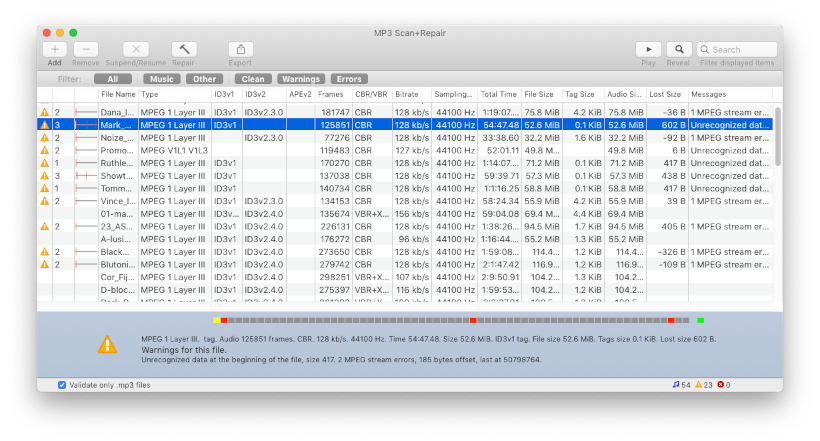
MP3 BETA Screenshot

Updated release of “MP3 Scan+Repair” is now available. See download link in the sidebar.
MP3 Scan+Repair works on Intel and PowerPC running OS X 10.5 Leopard or 10.4 Tiger.

Universal binary
for Leopard & Tiger
Download
If this free app is useful to you, then buy me a beer!
Version 1.1
triq.net blog © 1999-2009 Christian Zuckschwerdt – design & code

Comments
Excellent!
when moving from pc to mac i "lost" quite a few albums that itunes refused. this fixed all those files, and lightning fast!
thanks a lot!
This is great!!! Thanks
Easy!
This worked brilliantly, I'm on Mac OS X 10.6.4
Thanks very much!
Worked perfectly!
Very happy with the results! Thank you!
How repair works
Hi Dennis. Here is how repair works:
If missing information like flags or indexes is detected those are added to the file. Every other case would deal with damaged sections of the file. Most likely a chopped of end or some garbage in the midst of the file. Those damaged areas are then cut out as tight as possible and header information is updated. This will mean that you lose small parts of the file. On the other hand those would not have played sensible music anyway.
Sound quality will never be degraded, there is no reason for that. Tags will only get dropped if the formatting doesn't allow for recovery.
Be careful. Always make a backup and check the files after repairing them.
Many thanks and a question
It really works,now the tracks can be add in itunes..but one question do we have any loss??
I would be grateful to answer me to my email!!
Nice Work :D
Finally i can repair all my damaged mp3 files.
Remember this "NEVER USE ITUNES FOR GET COVERS"
Thank you for this APP. I Love it, i will recommend on my page ;)
Thanks
I had problems with a number of mp3's so much so that where possible I have been replacing them with m4a's. Some unfortunately could not be converted or replaced. I just tried you app on one such file and it repaired it. I then tried to convert it in iTunes to an AAC but iTunes spat the dummy and wouldn't do it. So, I used Max to convert it to AAC and re-imported it to iTunes and it now plays perfectly . . .
Fixed my problem
Worked great right away!
I am running 10.6.4.
Not starting?
Zaidi, you clicked the app to start it and nothing happend? You can try to look at the system log in Console.app, perhaps an error is reported there?
Didn't work
I downloaded the app to my computer and it didn't work at all.....I was just wondering how you would fix that. I have a brand new macbook pro just bought a few weeks ago
works!
Thanks - works amazing !!
Reapair not starting
Toby, when you press the "hammer" icon the program move the original file to the Trash for safety and then creates a new, repaired file in it's place. If both files are now identical I'd say the errors were not recoverable. Can you check again if both files are indeed the same and if so perhaps send me an example file where this happens?
Not working on OSX 10.5.8
I like the concept of this application, and it seems to correctly identify the problem I want fixed,"VBR is detected, but no VBR header is present", and says that it was fixed when I click on the hammer, but it is not fixed. What does happen is the file is copied to the trash, but the corrected file is not saved over the old one.
yellow triangle vs. red cross
Ben, as you guessed the red cross shows that no MP3 data could be found. It may be a badly broken file or in your case another file type (.ogg, .mp4, …). This repair tool only works for MP3 coded music files and won't even recognize other file types currently. A big update is on the way and it will address some of this.
difference between yellow triangle and red cross
Hello, thank you so much for writing this app, a great idea which has obviously helped lots of people.
I'm having some problems, which, I'm sure are entirely due to my lack of experience, I wonder if you could advise me please?
1) I'm not sure what the difference is between the files labelled with a yellow triangle and those with a red cross? Is the red cross a file that cannot be repaired?
2) The programme has identified very many files as problems where they have different file extensions: m4a, m4v, m4p etc. but it hasn't found any problem mp3s, which confused me because I have experienced quite a few problems of the type described above. Where it has identified mp3s as problems, I have looked at them in itunes and found them to be working (?) but other files I know to be problems aren't identified.
Marvellous!
I found a link to this page from http://trevinchow.com/blog/2008/09/17/fix-for-mp3-songs-not-playing-in-itunes/ which offers tips for the same problem on Windows. (The excellent freeware app called MP3 Validator available here)
I am absolutely convinced that it is iTunes itself which is screwing up the files - on both platforms - because I have experienced files working fine, which suddenly stop playing after I have edited the metadata in iTunes, and having never touched those same files with any other app.
It would be interesting to find out exactly how iTunes is screwing up. I am sure Apple would love to get *that* bug report.
On my Mac I just gave up ever getting my beloved Platters 8 disc box set rip to work properly. On Windows, it's too easy to discover that 'broken' mp3 files work just fine with Windows media player. I don't much like Windows media player, but it seems to be less prone to problems than iTunes.
So.. looking for a solution for the windows side (which worked, btw) led me here to the Mac equivalent, and lo! my Platters box set now plays perfectly. Now I am tempted to scan my entire library, except for the fact that it is absolutely enormous. I think I will just keep the utility around, in case there are any further problems of this sort.
Tags cut off at 25 characters
Richard,
ID3 v1 tags are at the start of a MP3 file (prepended) and are limited to short text. The newer ID3 v2 tags are at the end of MP3 files (appened). The newer tags are more flexible and have fewer limitations. Seems like your files might have been corrupted at the end and the repair process cut off the newer ID3 v2 tags. That way you now see the older (compatibility) tags. I'll see if I can make the next version of the repair a littler smarter about that. Perhaps you can send me on of the damaged files where this happend?
My tags get cut down
Works great to get files into iTunes that previously wouldn't play. Thanks a million!
But when the file shows up the tags for title and artist are cut down to about 25 characters. This truncating cannot be necessary to get the file to play because I have a bunch of files with longer tags that import and play just fine. Any help for disabling this truncating in Scan and Repair is greatly appreciated.
Rich
File not detected as MP3
Sophie, seems the file you try to repair isn't even detected as music file. It must be very badly broken. The program will scan every file bit by bit to see if music is contained anywhere in the file. The upcoming version will also tell you if your files have typical errors which make them unusable.
How repair works
Nik, thanks for your thoughts. Here is how repair works:
If missing information like flags or indexes is detected those are added to the file. Every other case would deal with damaged sections of the file. Most likely a chopped of end or some garbage in the midst of the file. Those damaged areas are then cut out as tight as possible and header information is updated. This will mean that you lose small parts of the file. On the other hand those would not have played sensible music anyway.
Sound quality will never be degraded, there is no reason for that. Tags will only get dropped if the formatting doesn't allow for recovery.
Be careful. Always make a backup and check the files after repairing them.
Question
How do I know if it's working? Everytime I place an MP3 file into the work area, it just says it's an unknown file format, and doesn't appear to do anything when I click Proceed... Am I missing something?
Nice App... Some thoughts
I was looking for a program like that because I couldn't import some files in Itunes for nothing. Files were playing good from finder and other apps but not in Itunes.
I managed to get them to work with Itunes after running MP3 Scan and Repair but i noticed some tags and even filenames getting lost and or even chopped off .... not quite sure if that is normal? (maybe part of the initial problem? so got chopped by your utility? just a though there.)
On a second thought Does this software affects MP3 playback in any way? I got too much legally bought music and treat it like a baby! Any special care advices to ensure quality aint gonna be affected in any way...?
Nice Program overall Cheers !!!
AAC format
John,
there are some programs which can restore the filename from the ID3 tag data. Perhaps that will help to restore your collection.
My program only works with MP3 format files maybe I'll support other formats in the future.
The upcoming version has an improved interface and will handle folders and other filetypes better.
Problem, questions and observation
Christian,
thanks, a very useful app.
I have been using it to clean up my wife's library which i have copied off her ipod onto a PC then moved over to my mac. I have run your app and there are still 10% of the files that won't import into itunes even after i have repaired them. the problem is that i can't tell which these files are. The files retrieved from the ipod are all mp3 or aac with the four letter ipod name. Have you any thoughts as to how i can isolate the troublesome 10% then perhaps I'll have a chance of figuring out why they won't import?
Question? Does the app work with any other file formats or is the problem unique to MP3s?
Observation: when i select the itunes library folder the app treats the sub folders as files with errors. The fact that they are listed seems like a mistake and certainly causes problems when choosing what files to select.
thanks
John
Worked great
Hi,
It worked great. I had some MP3s that iTunes refused to add to the library (although they would play in quickview, QT, and the like). I added them to MP3 Validator, hit 'repair' after it detected the errors, and everything worked perfectly.
Truncating broken files
Darius, there is an upcoming feature to warn you if this level of truncating is going to happen. What kind of error is displayed for your example file? Are there lots of sync errors or garbage? Send me the example and I'll have a look.
Macintosh MP3 files acting weird
I have a fairly large audio collection like most people now, but a lot of my old
CD/mp3 rips have hiccups now, like a record skipping. Will your application fix them, or simply truncate them into something completely worthless ?? I tried it on one file and it took a 6 minute song and turned it into 20 seconds of mush.
I was getting so frustrated
I was getting so frustrated trying to import my music. Thank you so much for a quick and easy fix :)
couldn't import mp3 to itunes 9
but now I can thanks to this! you, Sir, are a genius!!!
MP3 Validator for Mac OS X
Fantastic - been trying to back up friends Macbook - timecapsule crash till found erroneous files using this - all tickety boo now many Thanks
YES!
This is the only thing that works for songs that absolutely wont play in itunes. THANK YOU!
It worked like a charm! I was
It worked like a charm! I was trying too many ways to import some songs into iTunes but none would work. And then, after I used this app, everything is fine!
THANK YOU!
Unrecoverable errors
Sarah, the message "ERROR: unknown file format" means there is no valid header at all. Your files are not recoverable. If you like send me an example file and I'll have a look if there is any data left.
Hey Christian- I'm having
Hey Christian- I'm having some difficulty retrieving my music files since they were transferred onto my new computer from my fried laptop. When I drop my mp3's into the program, it says "ERROR: unknown file format". Am I doing something wrong, or do you think maybe the files got all wonky in the transfer process?
worked like a treat! thank
worked like a treat!
thank you :)
Thanks - GRAZIE!!!
Only one word: Thank!!!
Grazie!!!
Exactly what was needed!
Ausgezeichnet!
Vielen Dank! Dieses ding ist Super, aber meine Deutsch ist ein bisschen schwer. ;)
Many thanks! This thing did the trick! One song in my library (at this point) that wouldn't play in iTunes but played in absolutely everything else is now fixed and playing. YAY!
The tool is great
Thank you very much for sharing this.
I was looking for this long long time.
Thanks again.
Fixed it
WOW.. F***** WOW.. had an album that was wired - wouldn't play in itunes... and with this app it got fixed.. and i didn't even read any manual :)
thanks for the free ride.. i owe a donation asap!
GREAT! UNBELIEVABLE!
Fast, perfect, I'm amazed by this tool. Thanks, guys!
AMAZING TOOL!
Thank you. You're a lifesaver. I am going to donate ASAP.
Log file with errors
Great suggestion, thanks! I'll add both a log file and the option to create a playlist.
Suggestions?
Awesome tool, but I've got a suggestion to make it just a bit more useful: have some way to be able to log which files are corrupt. A lot of the files I find that have problems are no longer complete -- they're only a fraction of their original length after being repaired.
I'd like a way to log which files have been fixed, so I can then go and re-rip or re-download them. A text log file would be okay, but another possibility would be creating a "Repaired files" playlist in iTunes.
Just a thought -- thanks for creating this program!
No MP3 Scan+Repair on Windows
You are out of luck. MP3 Scan+Repair is for Mac OS X only.
MP3 Scan+Repair on Windows?
If I'm running Windows 7 how can use this tool?
Better interface: wizard style
Thanks for the suggestion. A more focused interface is upcoming!
Great tool
iTunes refused to add some of my MP3's, this application fixed them in a flash, thank you.
A suggestion, I see others posting about the same issue I had with the application, it wasnt very apparent what I needed to do once I dropped the mp3's into the application. Making a 'wizard' or just making the fix button more noticeable would be a vast improvement.
Saved my iPod sync!
I had this nightmare-like problem when trying to sync my iPod, iTunes kept saying "Attempting to copy to the disk failed. The disk could not be read from or written to." I tried many things, and almost ended up thinking the iPod was defective. But the defective stuff was the media! Two pass of this program on my iTunes Library and everything went fine again! THANKS A LOT!
BTW.. some mp3 said they were not MPEG streams, but RIFF files. They end up with a X icon and can't be repaired... since they were some mp3 I wasn't sure I could get again so easily, went back to iTunes and tried the option "Make MP3 Version" on each of these mp3 files.. and problem solved.
GREAT SOFTWARE! Thanks again!! :)
Post new comment