MP3 Scan+Repair for Mac OS X release 1.0
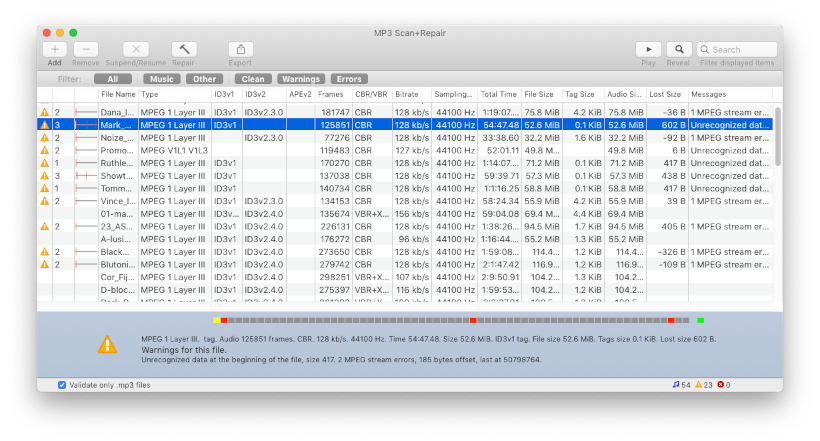
The audio repair tool MP3 Scan+Repair release 1.0 is available now. This utility (named MP3 Validator for OS X during the beta phase) will check and repair your MP3 audio files. This is especially useful to fix problems with more recent iTunes versions.
MP3 Scan+Repair works on Intel and PowerPC running OS X 10.5 Leopard or 10.4 Tiger.
The next things on the todo list are:
- Draw better Toolbar filter icons (All, Music, Warnings, Errors)
- Interface with iTunes (Selection from iTunes, iTunes Music folder)
- Add the localisation (German, maybe others?)
- A preferences window with settings for date/time preserving and such
See also the feedback forum (provided by UserVoice). Your ideas and comments are welcome!


Comments
Re: crash report and broken mp3 files
thanks for the report! I always like to get my hands on the crash reports and even better some broken mp3 files. Perhaps you can upload the files to some hoster and send me the link? (see the comment on free file hosters below.) I always remove links from comments for privacy. You can also just send me a mail.
Certain mp3-files make the application crash
Hi!
Thanks for a great application, much appreciated!
I believe I've found a bug though: adding certain mp3-files makes MP3 Scan+Repair crash, every time, with the exception type: EXC_BAD_ACCESS (SIGSEGV).
I have yet to figure out what these files have in common, but if you'd like more info I can email you the complete crash report, and copies of the mp3s, if needed.
Regards,
Daniel
Start problem?
I'm running 10.5.8 Intel and it's smooth here. Can you maybe look in the Console app for the system log and see if anything comes up there?
I've been looking for
I've been looking for something like this ever since switching to Mac, but I can't get the program to start! When I double-click on it, the icon appears in the doc, but there's no triangle beneath it and it's not in the alt-tab program select menu. It does show up in the force quit menu. 10.5.5 Intel; any ideas?
Thanks!
Hi! Your utility it's very useful! SOmetimes i get mp3 files that itunes does not reproduce. They work with QUicktime VLC and other players. Now with this utility these mp3 work even with itunes!
Thanks!
Invalid files
Jeremy, the program tries hard to find a (even partial) mp3 header and subsequent audio frames. If the header is chopped off (not that likely) or if the file is in a different format it’s a lost case sadly. Maybe your files are in a different format. Since you mention FX maybe the files are really WAV or AIFF? Perhaps try the “file” utility to check that (use Terminal, type “file ” drop a file there and press return). You can also send me a sample for analysis. Just put them on a free file hoster, see this article on 5 best free file hosters to pick one. Then send me the link — by mail if you like: zany @ triq net
couldn't get it to work
Hi - I've got some sound FX mp3s and the will not open anywhere. Quicktime says "not a valid movie file". Not to say your program doesn't work, but it didn't fix my mp3s.
Works!
It works like a charm! Previously, iTunes would choke on some mp3 files and now it doesn't anymore :-)
Thanks for the app
Thank you so much!
Thanks man for creating this awesome application. It works like a charm and now I can play my music through iTunes,
Wish you a very good luck.
How to start repairs
To start repairs: 1. select a number of damaged files (select a range by shift-click, or multiple files with cmd-click); 2. use the "hammer" icon to start.
The process is not as obvious as it should be -- I'm open for suggestions here!
Scan & Repair
Christian,
I use 10.4 Tiger. I scanned my MP3 files, and your program identified problems with some of them. How do I fix the corrupted files. Should I click on an icon to activate the fix? If so, which one?
Steve
Post new comment