Mouse Acceleration Preference Pane for Mac OS X
Update: See Mouse Curve App for Mac OS X!

Extented mouse settings
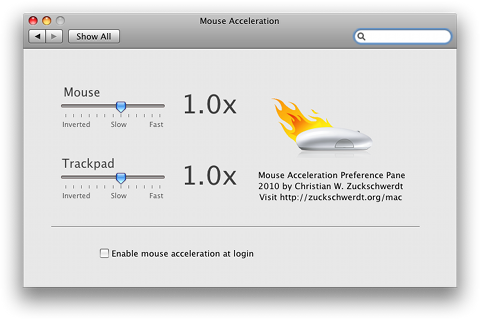
The Mouse Acceleration PrefPane is a GUI and startup item to Richard Bentley's MouseFix.
You can set up extended speed parameters and acceleration curves for your mouse.
- Increase mouse pointer precision
- Speed up your mouse movement
- Set mouse acceleration parameters
- Full control with just two simple knobs
Apple dropped the mouse acceleration API (scaling) with 10.6 Snow Leopard. There is now a version supporting 10.5 and 10.6 with 32/64bit.
This newer version 1.1 is without explicit acceleration settings. If you still run 10.5 Leopard you can use the 1.0 version with curves. With the 10.6 Snow Leopard version try a inverted setting at about -1.0x.
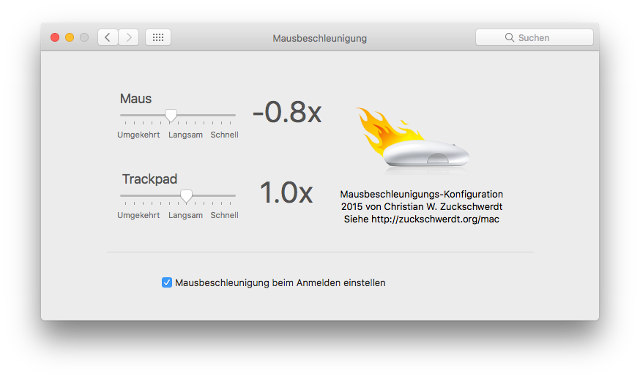
Screenshots


License
This is Free Software for Mac OS X
Mouse Acceleration Preference Pane is free.
You can use and redistribute it freely.

Download

Comments
Danke
klasse Tool, sobald man es braucht.
Also works ...
Incredibly well on my hackintosh!
Trackpad was awful. This fixed it.
Cursor Size with UA Zoom
I haven't worked with Cursor Zooming yet. I guess you could replace the used image with a custom one. I can't point you to the icon file without digging into the resource files though.
extreme mouse decelleration
Slowing the mouse down to only once across the screen while moving the mouse 10 meters in real space won't be easy with the current API. Setting a custom acceleration curve might do the trick (The curves can slow down arbitrarily as long as each movement results in at least one pixel).
Contact me by mail Kjell!
Thank you!
I was using SteerMouse before but this little thing is just what I need. Thank's! I was looking for the download link as well and it took some time until I've found it on the right side. You better include a link under the description / screenshots :)
Nice!
Very good to see something like this. I have always complained in my head that Mac mouse tracking is a lot harder to be accurate than PC's. I confirmed that today when i went to a friends house gaming all day on his PC, got home and tried to mouse on my Mac. All over the place. With a -1.0 I "feel" as tho its the same.
No doubt i will play around with the settings a bit, but i could NEVER get anywhere near what i wanted in speed and accel with any Mouse on Mac. Im pleased this software stumbled upon my findings and i Thankyou as much as the last and ones coming :D
PS: I also found it was hard to navigate from one button to another cos there was no speed in short distance moving. Changing to -1.0 helped HEAPS!!!
Increase the Peace
Resets at Startup
Thanks Zany! This tool is great. Unfortunately, the changes I make in the pref pane don't go into effect at startup... I may have to resort back to Jonathan's "crude excutable." Any progress on that front?
Also, it's kind of annoying to have to restart the entire pref pane just to run yours, is that some kind of 64bit issue? Thanks again!
Cursor Size
I have a Universal Access question. I need the cursor larger to see well, which I can do easily within the preference pane, but it has always annoyed me that the resolution of the cursor's enlargement is awful. It is very hard for me to find any information regarding this and I cannot even find the file location of the cursor image. Any help would be appreciated.
mouse decelleration?
Hi
I would like to slow down the mouse, so that moving the mouse 10 meters in real space only reaches across the screen. To be able to paint on the screen while dancing.
Is that possible?
best
Kjell
64 bit
A true 64-bit version needs very different code for the preference pane. At the moment I'd rather keep the backwards compatibility to 10.5 and 10.4.
I'm still investigating why the setting resets at startup.
Doesn't take affect at startup
Hi. This tool is great! I have it set to -0.4x and that works perfectly for me, however it doesn't seem to be working at login. The mouse speed goes extremely slow, and I have to go into preference and just click on the slider and it all works. I note that 1.1c was supposed to fix something like this? I have downloaded the latest version, but nothing is better ('get info' shows files version as 1.1 not 1.1c is that right?). Also, it always switches to 32 bit when opening in pref pane - sis that right? I am on latest build of Snow Leopard. Cheers.
Sign the petition
I'm trying to get Apple to change their minds on this. It worries me that they've removed the acceleration API call.
http://www.petitiononline.com/MacMAcc/petition.html
No, you can't, apparently OS
No, you can't, apparently OS X' built-in mouse speed pref pane overrides accel pref pane and vice versa, due to Apple's decision to merge speed and acceleration. Try to set the mouse speed most left and THEN an accel like -1.0x. Then try to set an accel like -1.0x andthe mouse speed most right. You will get the exact same result.
I was looking forward to trying this pref pane but couldn't find a value that felt natural. Maybe someone did find one? I'm using a Magic Mouse on a 22" screen.
Default values
The Default value should be 1.0 or 2.0. You can also use the build in mouse speed pref pane. To set a value.
How do you reset this to
How do you reset this to default values?
boy ... i wish someone smart
boy ... i wish someone smart could fix xp's acceleration which was broken right under everyones noses
Speed and2 Acceleration levers
Hi Steve. Since the new Snow Leopard OS X 10.6 there is no API call to set the an acceleration value. It's all combined into the speed setting. So it's just one slider now.
Check values set from the built-in Pane
Thanks Rob K. Your suggestion makes a good point. I'll add some code to check the current value set from the built-in Pref Pane.
Use negative settings!
Please note that the settings allow for negative values. Those settings reduce the acceleration for most people.
Love
I think I love you. Thank you so much. I was getting carpel tunnel because my mouse wouldn't work in 10.6. Thank you Thank you Thank you Thank you Thank you Thank you Thank you Thank you Thank you Thank you Thank you Thank you Thank you Thank you Thank you Thank you Thank you Thank you Thank you!!!!!!!!!!!!!!!!!!!!!!!!!!!!!!!!!!!!!!!!!!!!!!!!!!!!!!!!!!!!!!!!!!!!!!!!!!!!!!!!!!!!!!!!!!!!
Thank You so much!!!!
This has been the worst "feature" of my mac (10.6.4 snow leopard) ever.
And finally you provided a solution!!!
-4x to -5x works best for me.
What I dont get is, why there is only one lever?
Shouldn't there be 2 levers?
1 Speed
2 Acceleration
Thanks again! Donation on the way!
Steve
Dream!
This is like a wonderful dream! Wonderful!
MouseZoom and Apple's Mouse PrefPane
I have been trying out Mouse Acceleration v1.0 on Tiger and have been comparing it to another FREE program MouseZoom.
Mouse Acceleration has much better graphics. But if I change the acceleration settings using the Apple Pref Pane, the new value does NOT show up in Mouse Acceleration Pref Pane. It shows the wrong value.
This behaviour does not happen with MouseZoom. i.e. If I change the acceleration settings using the Apple Pref Pane, the new value DOES show up in the MouseZoom Pref Pane.
It would be great if you could make Mouse Acceleration check and display the right acceleration value.
Thank you!
Finally!!! Really really thank you!!!
And an extra speed adjustment would make this utility perfect!
This does nothing - it's just
This does nothing - it's just a duplicate of what the standard mouse tracking speed does!? Am I missing something here?? I still have an annoyingly uncontrollable mouse action with this application set to run at login.
If I set it to 1.0x the mouse is unusably slow (OS X Mouse Tracking speed is at the furthest left position)
If I set this to 1.2x the mouse is unusably fast (OS X Mouse Tracking speed is at the 4th position from the far right)
If I set this to 1.1x the mouse feels exactly the same as it did before I installed it and funnily enough...OS X Mouse Tracking speed is at the 4th position from the far left, which is exactly the same position as I used to have it set at...and still annoying!
It seems to me that this pref just takes the 10 increments of the standard mouse tracking that is built into OS X and turns it into 4 increments! (Far left, far right and 4 from each end!) :-/
seems to me that the default
seems to me that the default value for the trackpad is actually 1.0.
2.0 seems intolerably fast.
great software! way to go!
Default values for Mouse and Trackpad
Apples default values seem to be 2.0 on both Mouse and Trackpad.
what are the default values
what are the default values for mouse and trackpad on version 1.1?
danke
oh my f**** god, u made my day......
i've bought a magic mouse and was about to throw it out of the window, cos the mouse acc. nearly drove me insane....
vielen dank ^^
More settings
Sorry Gn0m4, it's not possible to have different settings for speed and acceleration. There is only one setting in the Apple API.
Great but no speed scroller
-1x is perfect for acceleration but to much speed for mouse movement. There´s no different in velocity with -0.1x
Can you put other scroll to adjust it?
Thanks!
FINALLY!
I realize i am likely saying the same thing as everybody else (i haven't read through all the comments) but this is THE GREATEST THING EVER. I have been a mac lover for years, but also always infuriated by this MAJOR problem with the mac OS. Thank you so much for finally offering a non-hack style of fix that is dependable.
Thank You!
Thanks so much!
I just wanted to come back here and thank you from the bottom of my heart for this wonderful tiny piece of software.
I've been a Mac user for about 6 months and the mouse acceleration made me life on a Mac miserable. A pain. I absolutely hate the way macs handle acceleration. It's like you drag your cursor in a layer of mud when you need precision slow movement, and if you are a designer you are in deep s***. Macs are wonderful but it's unbelievable how they can go sooooo wrong with a basic extremely important feature like the mouse cursor movement! At least you should be able to turn it off without third party plugins, but noooooo...
I managed to survive these 6 months by using different scripts and settled to one that I had to restart myself after each reboot (several times a day). It was a pain but I could get my cursor to move as it should. After installing your software I can finally start my mac and do my work immediately without worring about the shitty acceleration every time.
I find it funny and interesting that some of my friends that also switched to macs recently find the new acceleration normal and not different from windows. How's that possible? Are we so different as human beings? Are we more sensible or are they too ignorant? :)
Prefpane location
The PrefPane is located either at "Your User" / Library / PreferencesPanes or (if you installed for all users) "Your HD" / Library / PreferencesPanes. It's called "Mouse Acceleration.PrefPane" (maybe without the space). It's the same for every PrefPane on your system.
Downloaded 1.1 and installed
Downloaded 1.1 and installed it on 10.5. Now I'm trying to uninstall it. However I can't seem to find the file MouseAcceleration.prefPane in that location. Neither does spotlight. Am I missing something? :)
uninstall instructions
chris, uninstalling is easy: the whole package is contained in one "file". It's located at ~/Library/PreferencePanes/MouseAcceleration.prefPane -- just delete it in Finder.
thanks alot, this works
thanks alot, this works (ive tried usboverdrive, intellimouse-driver, steermouse, nothing was satisfying)!
just for curiousity: is there a way to uninstall the mousefix and the preferance pane? sorry if thats a dumb question, but im all new to osx.
Thank you!
This software has allowed me to use my mouse without banging my head against a wall in frustration with OSX's weird, choppy mouse movements!
THANKS!
Updated downloads
There are new downloads now, release 1.0c for 10.4 + 10.5 and release 1.1c for 10.6.
A small bug regarding unicode text in login items which could block the pref pane from running has been fixed.
autostartup on 10.6
Steve, I don't know about a fix for startup on 10.6. I don't remember any bug report. Mail me some details and I'll get on this.
autostartup fix? anytime this year?
Hey I've been checking your site since: Mon, 2010-03-08 10:34. Which you've gotta admit, is a long time, and there still isn't a fix for the auto start bug in 10.6, I really do appreciate that you do this in your own time and I'm in no way trying to sound ungrateful. But please fix this issue! it drives me crazy having to re-enable your prefpane settings every time I turn on my mac.
Thanks,
Steve
This works.
This works. Thank you so much.
Thanks
Thanks, this was the thing that most annoyed me when switching from XP to OSX!
Thank you so much! Can't
Thank you so much! Can't believe Apple haven't sorted this out!
Petition regarding Apple mouse settings
Hi guys if your irritated by the mac mouse acceleration too, then please sign this Petition. We need a change this problem and apple needs to know that!!
http://www.petitiononline.com/MacMAcc/petition.html
Thank you and let us hope ^ ^
More windows-like?
Anyone know what the best settings are in 1.1 to make the mac cursor feel like windows? BTW thanks for writing this program, wish apple would finally fix it in OS!
Thank You!!
Thank you so much.
I hate apple for not allowing me to change the settings that I need to be able to to make their stuff useable. Your prefpane has finally fixed my mouse issues!!
Keep up the great work.
This is almost what I was
This is almost what I was looking for... Changing it to -6 does seem to make it LINEAR (without acceleration) but it moves way too slow.
I hate how if I move slow the cursor moves to a crawl. Hopefully a newer version will fix this.
Perhaps -24...
Thanks so much!
Thanks a lot, i listen to so many music files a day and this app helped me A LOT. I use Snow leopard.
Post new comment